

Class booking software should control capacity, apply your cancellation rules, move the waiting list when a place is freed and notify whoever is affected, without you having to check it by hand.
Booking from an app helps, but it only solves part of the problem. The system also has to know whether the student has balance available, whether they can cancel and whether the group is compatible. That is why, when comparing class booking software, it pays to look less at the calendar and more at the rules it lets you configure.
Management gets complicated when every booking depends on a manual check. One person cancels, another wants to join, the teacher asks who is coming and admin ends up jumping between WhatsApp, calendar, class packs and attendance. That hidden work is exactly what efficient academy software should remove.
What saves the most time is defining the policy once and letting every booking, cancellation or free slot follow it. That way students gain autonomy, the team sees up-to-date information and admin stops acting as the go-between for every small change.
Which features should class booking software include?
Booking, capacity, cancellations, class packs and balances, waiting list, a team view and notifications, all connected. A good platform links each place with the center's day-to-day work. If it only shows events, the calendar can look tidy while the important work stays scattered across messages, sheets and memory. That is also why, when choosing an academy management program, you should check whether booking, attendance, balances and communication work together.
| Center need | What the platform should solve |
|---|---|
| Class booking | The student sees valid slots and books without messaging the front desk |
| Capacity | Nobody joins beyond the capacity of the group, room or court |
| Cancellations | The place is freed according to the window set by the center |
| Class packs and balances | The booking is validated against available sessions |
| Waiting list | The next person gets the slot when it is their turn |
| Team | Teachers and coaches see the updated list |
| Notifications | Changes reach the people affected |
The practical point is simple: if someone cancels within the deadline, the place is freed; if someone is waiting, the list moves; if the student has no balance or the group does not fit, the booking is not left pending a last-minute check.
Which booking and cancellation rules should you define?
Seven: cancellation window, effect on balance, compatible groups, capacity, expiry, waiting-list order and notifications. Before automating bookings, cancellations and waiting lists, the center needs its policy in writing. It looks secondary until the first awkward case arrives: someone gives late notice, a family asks to make up an old class or a group fills up more than is reasonable.
| Decision | Practical question |
|---|---|
| Cancellation window | Until when can someone cancel without losing the right to a make-up class? |
| Effect on balance | Does the cancellation return a session, create a make-up class or have no effect? |
| Compatibility | Can they book any group or only equivalent groups? |
| Capacity | How many places does each group, room, court or classroom allow? |
| Expiry | For how long can a make-up class or class pack be used? |
| Waiting list | Does it move by order, by group, by level or by internal priority? |
| Notifications | Who is notified when a place changes? |
If these decisions are left open, admin makes them again and again with every message. If they are configured, students can move within clear limits and the center keeps its criteria without reviewing every case from scratch.
To go deeper, see how to manage make-up classes without depending on WhatsApp, the make-up class policy template, schedule management in academies and the alternatives to Excel for academies.
Do bookings change depending on the type of center?
What changes is what makes a place valid; the logic is the same. In fitness centers, barre, pilates, yoga and functional training work with capacity, class packs and regular groups. In padel and tennis schools, students also have to be organized by level, schedule and coach, and a make-up class must fit the school's policy and the group the student asks to join. In music, dance, theater and art centers, the place must fit by level, teacher, room, instrument, style or workshop. In languages and tutoring, the booking or make-up class has to respect level, subject, age and group.
In every case, a free place should move according to a clear rule. If the center also has several teachers, the guide to running an academy with several teachers covers the team side.
How do class bookings work in Clasbi?
Clasbi is management software for academies and sports centers that brings schedules, attendance, make-up classes, communications and payments together in one place.
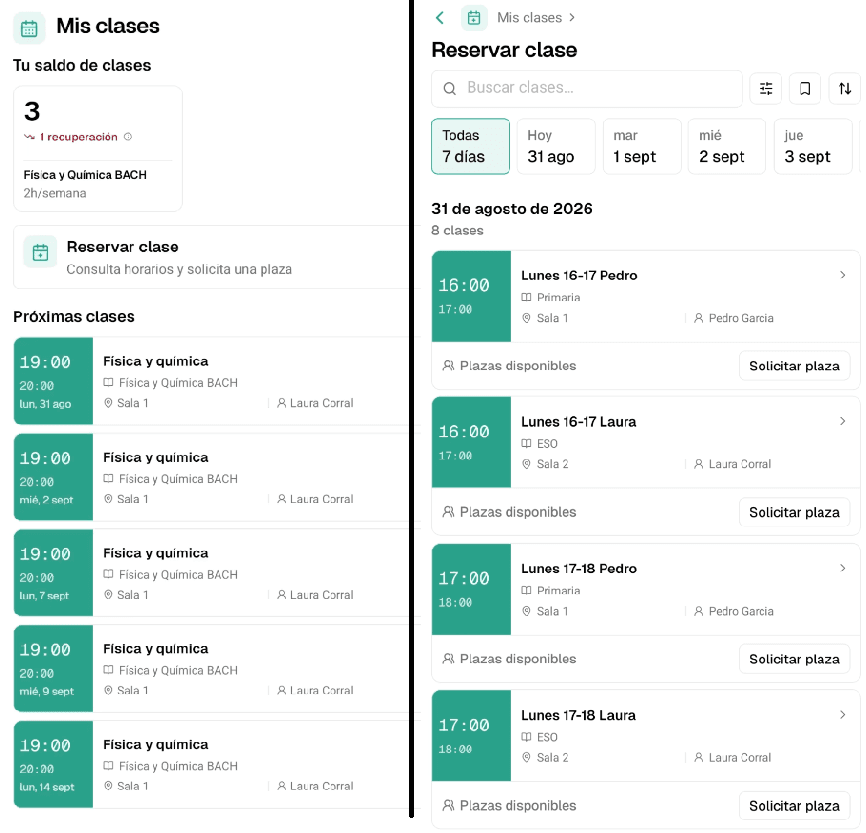
In the app, the student can open My classes, see their balance, check upcoming sessions and go to Book a class without messaging the front desk. From there they search for classes, filter by day and request a place only in available options. The center decides whether admin approves those requests or Clasbi approves them automatically when they meet the configured rules.
How does the waiting list work in Clasbi?
In Clasbi, students can sign up for a class even when there are no places left, and they go onto the waiting list. If someone cancels and frees up the slot, Clasbi checks who signed up first and confirms the place for them automatically, without admin having to message anyone or check the order by hand. At that moment the class is deducted from their balance and they get a notification confirming the place.
The list moves in sign-up order, so the rule is the same for everyone and does not depend on who replies first to a WhatsApp message. If another place frees up, it goes to the next person on the list.
The academy or center defines the policy once. After that, every booking, cancellation and free slot works on that basis: students gain autonomy and admin stops chasing bookings and cancellations on WhatsApp.